
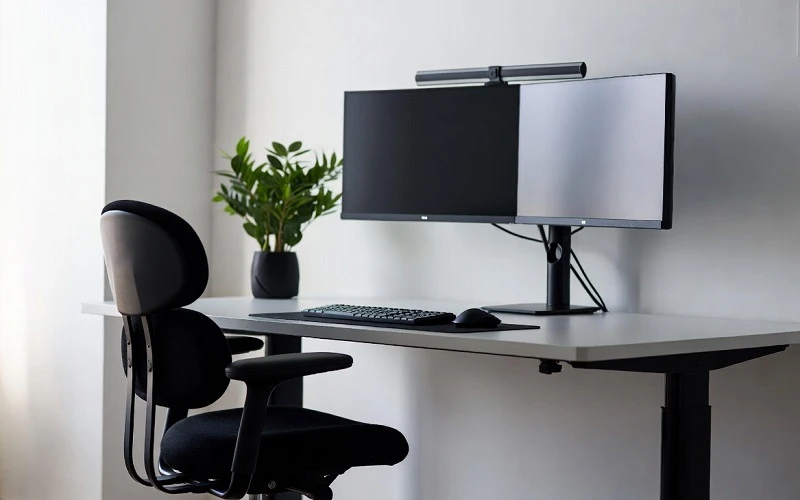
Modern workplaces rely heavily on computers, making it essential to create environments that support employee health and efficiency. Many office professionals spend several hours each day using desktop computers, laptops, or multiple monitors. Without a properly designed workstation, this routine can contribute to discomfort, fatigue, and repetitive strain injuries that affect both individual well-being and workplace performance.
Ergonomics is the science of designing workspaces, tools, and tasks to fit the needs of the person using them. Rather than expecting employees to adapt to poorly designed environments, ergonomic principles focus on reducing physical stress and promoting natural body movements. For computer users, this means arranging workstations that encourage proper posture, minimize repetitive motions, and support long-term health.
In addition to workstation adjustments, employees and employers can benefit from learning more about ergonomics for computer users at work. Understanding ergonomic principles enables organizations to create safer work environments while helping employees reduce discomfort, improve posture, and maintain productivity throughout the workday.
Why Ergonomics Matters in the Workplace
Prolonged computer use often leads to musculoskeletal issues, particularly in the neck, shoulders, back, wrists, and hands. These problems usually develop gradually due to repetitive movements, awkward postures, or sitting for extended periods without sufficient movement.
Poor workstation design can also contribute to eye strain, headaches, and reduced concentration. Employees who experience ongoing discomfort may become less productive, require more frequent breaks, or take time away from work due to preventable injuries.
Implementing ergonomic practices benefits both employees and employers. Comfortable workers are generally able to maintain focus for longer periods, perform tasks more efficiently, and experience fewer work-related physical complaints. Organizations may also benefit from reduced absenteeism, lower healthcare costs, and improved employee satisfaction.
Essential Elements of an Ergonomic Workstation
Creating an ergonomic workstation does not necessarily require expensive equipment. Small adjustments can significantly improve comfort and reduce physical strain.
A computer monitor should be positioned directly in front of the user, with the top of the screen approximately at eye level. The monitor should be about an arm’s length away to reduce neck movement and eye fatigue.
The keyboard and mouse should be placed so that the elbows remain close to the body and bent at roughly 90 degrees. Wrists should stay in a neutral position rather than bending upward or downward while typing.
An adjustable chair is equally important. The chair should support the lower back while allowing the feet to rest flat on the floor or on a footrest. Knees should remain approximately level with or slightly below the hips to encourage healthy sitting posture.
Lighting also plays a significant role in workstation comfort. Reducing glare from windows or overhead lights can help prevent eye strain and improve screen visibility throughout the workday.
Developing Healthy Computer Habits
Even the most ergonomic workstation cannot eliminate the effects of sitting in one position for hours. Employees benefit from incorporating regular movement into their daily routines.
Standing up every 30 to 60 minutes, stretching, or taking a brief walk can improve circulation and reduce muscle stiffness. Simple shoulder rolls, neck stretches, and wrist exercises can help relieve tension caused by repetitive computer tasks.
Following the 20-20-20 rule is another effective strategy for minimizing digital eye strain. Every 20 minutes, users should look at something approximately 20 feet away for at least 20 seconds. This allows the eye muscles to relax after prolonged screen use.
Maintaining proper posture throughout the day is equally important. Keeping the shoulders relaxed, back supported, and head aligned over the spine helps minimize unnecessary stress on muscles and joints.
The Employer’s Role in Workplace Ergonomics
Employers play an important role in promoting ergonomic practices across the organization. Providing adjustable office furniture, ergonomic accessories, and workstation assessments demonstrates a commitment to employee well-being.
Training programs can educate employees on proper workstation setup, healthy posture, and the importance of regular movement during the workday. Even simple reminders to adjust chairs, reposition monitors, or take short breaks can encourage healthier work habits.
Organizations may also consider evaluating workstations periodically, particularly when employees change roles, relocate workspaces, or begin working remotely. These assessments help ensure that ergonomic standards continue to meet employees’ needs.
Remote and hybrid work arrangements have further emphasized the importance of ergonomics. Employees working from home often use makeshift workspaces that lack proper support. Employers can assist by offering ergonomic guidance, equipment recommendations, or workstation evaluations to maintain consistent health and safety standards regardless of work location.
Long-Term Benefits of Ergonomic Practices
Investing in workplace ergonomics provides lasting benefits for both individuals and organizations. Employees who work in comfortable environments are more likely to experience reduced physical discomfort, better concentration, and improved overall job satisfaction.
Over time, proper ergonomic practices can help lower the risk of repetitive strain injuries, chronic back pain, and other musculoskeletal disorders associated with prolonged computer use. Preventing these issues contributes to healthier employees and a more productive workforce.
Ergonomics also supports employee retention by demonstrating that organizations value workplace safety and long-term well-being. A proactive approach to workstation design helps foster a positive work culture while reducing costs related to injuries, absenteeism, and lost productivity.
Conclusion
Ergonomics is a practical investment in workplace health, safety, and productivity. As computer-based work continues to dominate modern offices, properly designed workstations and healthy work habits become increasingly important. By combining ergonomic equipment, thoughtful workstation design, regular movement, and employee education, organizations can reduce the risk of work-related discomfort and improve overall performance. Prioritizing ergonomics creates a healthier work environment that supports both employee well-being and long-term business success.
